 how-to
How to Evaluate Original Art Quality From Digital Images
Table of Contents
- Why Digital Images Can Mislead You About an Original Painting
- Step 1: Check the Image Source and Whether It Is Original
- Step 2: Confirm Artwork Image Resolution Is Sufficient
- Step 3: Judge Color Accuracy and Lighting
- Step 4: Assess Painting Texture and Surface Detail Online
- Step 5: Spot Edits, Enhancements and Image Defects
- What a Digital Image Cannot Tell You About Condition and Value
- Requesting Better Images and Documentation Before You Buy From Susan Fielder Art
- Frequently Asked Questions
Why Digital Images Can Mislead You About an Original Painting
A photograph can shape a buying decision a great deal. A digital image is useful, but it is not the same as standing in front of the work. Colors can shift, texture can disappear, and a flat picture cannot show how a canvas feels or ages.
A 2020 study compared high-quality digital color reproductions with the originals. It found that slightly more colorful reproductions were often preferred. Reymond et al., Aesthetic Evaluation of Digitally Reproduced Art Images, Frontiers in Psychology The lesson is simple: a vivid image can make a painting look better than it is.
This guide shows you how to evaluate original art quality from digital images, and what a digital image can and cannot tell you. You will learn to:
- Check where an image came from
- Judge resolution, color, and lighting
- Look for surface detail and edits
- Know when you need more proof before you buy
Watch out: A stunning photo is not proof of quality. Treat every image as a starting point, not a final answer.
Step 1: Check the Image Source and Whether It Is Original
Start with the source. Ask who took the photo and whether it shows the real piece, because learning how to evaluate original art quality from digital images begins with trusting where the file came from. Official photos are generally a better sign than a screenshot pulled from social media.
Look for these details:
- The artist's name and the title of the work
- Dimensions in inches, not just pixel size
- The medium, such as acrylic on canvas
- Whether the listing says "original" or "print"
If a listing is vague about any of these, ask before you buy. Original work should be described clearly and consistently.
Step 2: Confirm Artwork Image Resolution Is Sufficient
Resolution tells you how much detail the image holds. For quality print reproduction, digital images typically need to be between 200 and 300 dpi. What Artists Must Know about Digital Images, Artsy Shark
Keep in mind that resolution is only about the file. A sharp image can still hide poor color or bad lighting. Use resolution as one check among several.
Try these quick checks:
- Zoom in on a signature or edge and see if it stays crisp
- Look at fine lines or brushwork without heavy blur
- Ask for a larger file if the photo looks soft
Step 3: Judge Color Accuracy and Lighting
Color is where most online art disappoints. A screen, a camera, and room lighting can all change how a painting looks. To judge color accuracy from a digital image, you need to separate what the file actually contains from what your display is doing to it.
Start with the file's own color information. An image should accurately represent its subject, or provide a profile or target that lets the viewer correct tone and color. Assessing the Quality of Digital Images, Digital Library Federation In practice, look for an embedded ICC profile or a neutral reference in the frame, a gray card, a color checker, or a white sheet of paper. If the photographer included a neutral target, you can check whether whites read as neutral or carry a blue, yellow, or magenta cast. A cast that appears in the whites usually means the whole image is shifted.
Use this checklist to rate color and lighting on each line:
- Neutral whites and blacks: Whites read as white, not cream or blue; blacks are deep but still show detail rather than clipping to pure black.
- Even illumination: No hot spots, dark corners, or gradients across the canvas that suggest a single light source or a flash.
- No glare or reflections: Specular highlights on varnish, glass, or glossy paint obscure color and texture beneath them.
- Plausible color for the medium: Acrylic and oil behave differently; a watercolor that looks neon or an oil that looks chalky is a warning sign.
- Background consistency: The wall or backdrop color matches at the edges of the canvas, which helps confirm the white balance was set for the artwork rather than the room.
If the image fails several of these checks, ask for a re-shoot or a raw file before you rely on it.
Watch out: A common pattern is a photo shot under warm indoor bulbs that makes a cool-toned painting look muddy; if the seller cannot provide a daylight or color-balanced version, treat the color as unknown.
To reduce misleading judgments, compare the image and the physical work (or two images of the same work) under controlled viewing conditions: same screen brightness, same viewing distance, and the same ambient light. Differences that persist across two displays are more likely to be real; differences that vanish when you change screens are probably display artifacts. If you cannot see the work in person, ask the seller to photograph it beside a neutral gray card and in indirect daylight, this single request resolves most color disputes before purchase.
The checklist below gives a quick way to rate color and lighting on any listing photo.
| Check | What to look for | Warning sign |
|---|---|---|
| Neutral whites and blacks | Whites read as white; blacks keep detail | Whites look cream or blue |
| Even illumination | No hot spots or dark corners | Gradients across the canvas |
| No glare or reflections | Clear view of paint color | Highlights on varnish or glass |
| Plausible color for medium | Matches how the medium behaves | Neon watercolor or chalky oil |
| Background consistency | Backdrop matches canvas edges | Edge colors shift from the work |
Step 4: Assess Painting Texture and Surface Detail Online
Texture is hard to judge in a photo. Thick paint, palette knife work, and layered surfaces often flatten out on a screen.
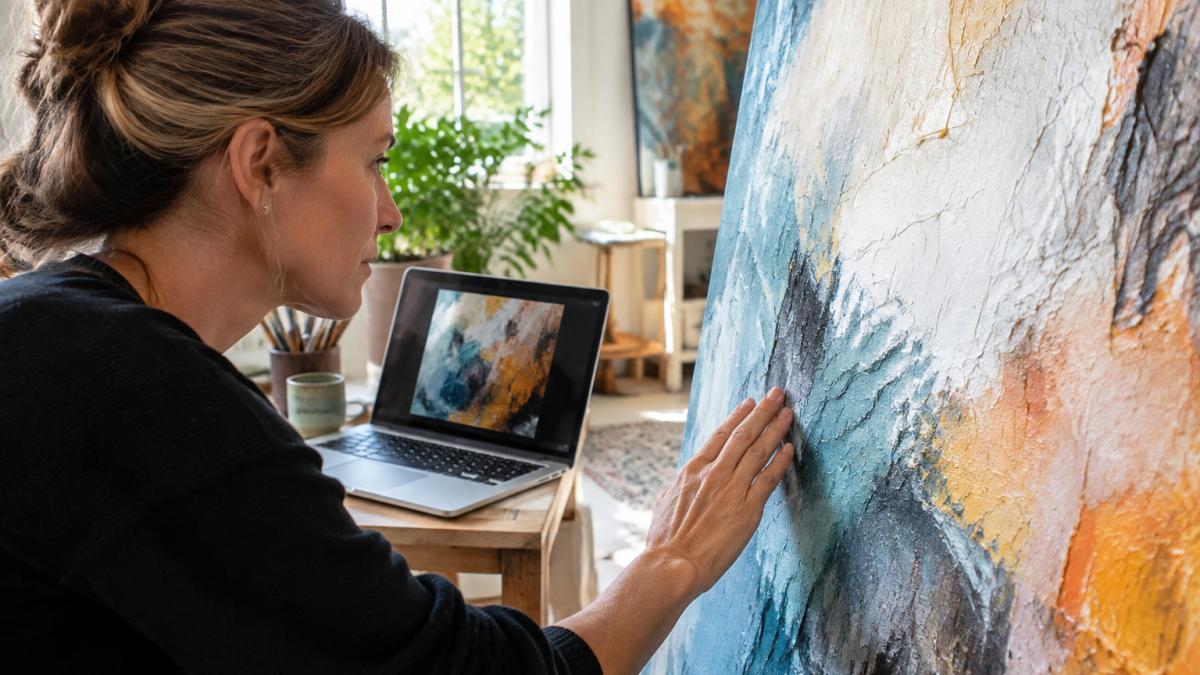
Look for raking light in the photo, meaning light that falls across the surface at an angle. Ridges and layers often show up better that way.
Ask yourself:
- Can I see brush marks or paint build-up?
- Does the surface look consistent across the whole piece?
- Would a close-up or video show more?
If the surface is central to the painting, request a close-up or a short video before you commit.
Step 5: Spot Edits, Enhancements and Image Defects
Many photos are edited. Some edits are normal, like cropping or light correction. Others can make a painting look different from the original.
Watch for these warning signs:
- Halos or smearing around edges
- Colors that look too saturated or too flat
- Cropping that hides the frame or signature
- Repeated patterns that look copied
Compare several photos taken at different angles and times. Real artwork images are consistent. Heavily retouched images often are not.
Watch out: If you see blur, color banding, or strange edges, the image may be compressed or edited too much to judge fairly.
What a Digital Image Cannot Tell You About Condition and Value
A photo cannot show everything. It cannot reliably reveal cracks, flaking paint, varnish problems, or the true condition of the materials. It also cannot tell you the market value of a work.
Separate three questions that a digital image tends to blur together:
- Image quality, Is the file sharp, color-accurate, and free of artifacts?
- Artistic quality, Is the composition, handling, and execution strong?
- Condition and authenticity, Are the materials sound, unaltered, and consistent with the attributed artist and date?
A well-photographed painting can still be weak, and a poorly photographed one can be excellent. Keep those questions separate, and never let a strong image quality score stand in for condition or value.
What requires in-person inspection, and why a photo fails:
- Surface texture and paint build-up: Raking light can hint at impasto, but it cannot tell you whether ridges are crisp or flattened by varnish, or whether the paint is stable.
- Repairs and inpainting: Retouching is often color-matched under one lighting condition and invisible in a photo; ultraviolet light reveals older restorations that a normal image hides.
- Pigments and fading: A camera's white balance and saturation settings can mask or exaggerate fading; only a physical comparison against a known reference or a conservator's exam is reliable.
- Signatures and inscriptions: A photo can show a signature exists, but not whether it is incised, applied later, or consistent with the artist's hand.
- Provenance and documentation: Paper trails, labels, and receipts are physical or documentary evidence; a listing photo cannot substitute for them.
For condition and value, ask for:
- Clear, dated photos of the front, back, and edges, plus close-ups of any areas the seller describes as worn or repaired
- A description of the materials, framing, and any known restoration
- Any available documentation about the work's history, including prior sale records or exhibition labels
- A return policy that lets you inspect the work in person and return it if it does not match the images
Be careful with any listing that claims a precise value based on a photo alone. A digital image cannot certify condition, authenticate a signature, or establish market value. Treat the image as a filter, not a verdict, and plan an in-person review or a professional opinion for any work where condition or authenticity drives the decision.
Requesting Better Images and Documentation Before You Buy From Susan Fielder Art
If the images leave you unsure, ask for more before you buy. A reputable seller should be glad to help. You can request more photos and details before you check out.
Good questions to ask include:
- Can you send a larger file or a close-up of the surface?
- Can you show the piece in natural light?
- Can you confirm the dimensions and medium?
- What is your return or exchange policy if the work does not match the images?
If you want to know more about buyer protections, review what to look for in online art gallery buyer protection. Shop with a clear eye, and you can enjoy your original piece for years.
Frequently Asked Questions
How can you tell if an artwork is original from a digital image?
A digital image alone cannot prove originality. Look for a clear signature, an artist statement, provenance details and a verifiable seller history, and ask for close-up photos of the signature, the back of the canvas and any labels or stamps. Compare the image against the artist's documented body of work. Digital reproductions can look convincing, so treat image-only evidence as a starting point and request additional documentation before buying.
What resolution should an artwork image be for close inspection?
For print-quality reproduction, digital images are commonly recommended at around 200 to 300 dpi. For judging detail online, ask for high-resolution files that let you zoom into brushwork and edges without visible pixelation. Resolution alone does not guarantee accurate color or surface fidelity, so pair it with the other checks in this guide.
Can a digital image accurately show an artwork's color and texture?
Not reliably by itself. Digital reproduction characteristics can shape how people judge a work. Good image-quality practice is for images to accurately represent their subject or include a color target for correction. Ask whether the photo was color-calibrated and whether it was taken under neutral lighting.
How do you distinguish an original painting from a print online?
Look for visible brushwork, paint buildup, and texture that changes direction across the surface, which prints usually flatten. Request a raking-light photo, meaning light cast across the surface at a low angle, to reveal relief and canvas weave. Ask for the dimensions, medium and edition information, and whether the work is signed by hand.